
Here’s a fun question.
How many computers are connected to your Wi-Fi?
Now think about it again, because I’m not just talking about the obvious computers. Sure, you probably have a laptop or two. Maybe a desktop. Your phone. Your spouse’s phone. A tablet. Maybe your kids have Chromebooks or iPads.
But what about everything else?
Your TV. Your printer. Alexa. Google Home. Security cameras. Video doorbells. Light switches. Thermostats. Streaming boxes. Game consoles. Speakers. Appliances. Maybe even a refrigerator, washer, dryer, garage door opener, sprinkler controller, robot vacuum or one of those Wi-Fi-enabled kitchen gadgets somebody bought because apparently pushing a physical button has become too exhausting.
Anyone have a smart toaster yet?
Give it time.
I know this won’t come as a shock to anyone, but we have quietly reached the point where half the stuff in our homes and offices is basically a tiny computer. And we keep connecting all of it to the same network.
That’s convenient, of course. Your phone can find the TV. Your computer can print. Alexa can turn off the lights. Your security camera can send an alert to your phone while you’re sitting at work wondering why the Amazon driver decided that “behind the planter” means “directly in the middle of the front porch.”
All of these devices being able to find and communicate with each other is part of what makes a smart home or smart office useful. But there’s another side to that convenience. Your laptop, TV, printer, doorbell and Wi-Fi toaster may all be hanging out together in the same digital room.
And that may be worth reconsidering.
Your TV Is Doing More Than Displaying a Picture
This whole topic caught my attention recently because of a pretty wild investigation involving LG smart TVs.
Gamers Nexus, a technology outlet known for extremely detailed hardware investigations, took a deep look into LG smart TVs and made some serious claims about what those televisions are doing behind the scenes. Among the concerns were data collection, Automatic Content Recognition, device discovery, advertising systems and the way certain voice-related features operate.
LG pushed back pretty hard.
The company specifically disputed allegations that its televisions secretly record ambient conversations in people’s homes. According to LG, voice data is only processed under specific circumstances, such as when someone presses the voice button on a remote or when a user has intentionally enabled a wake-word feature such as “Hi LG.”
LG also says that Automatic Content Recognition, often shortened to ACR, is an opt-in feature and that data from it is not used for advertising without consent.
So there is clearly disagreement between the researchers and LG over some of the more serious claims.
But there was one part LG did not dispute.
Its smart TVs can identify compatible devices on the same local network.
LG says that is normal functionality designed to support things such as content sharing, smart-home features and connections with other devices. And technically, they’re right. That’s not necessarily sinister. Your television needs some way to discover devices if you’re trying to cast something from your phone. Apple AirPlay needs to find compatible devices. Media servers need to announce themselves. Smart speakers need ways to locate other devices around the house.
Device discovery is part of how modern networks work.
The problem isn’t necessarily that your television can do this.
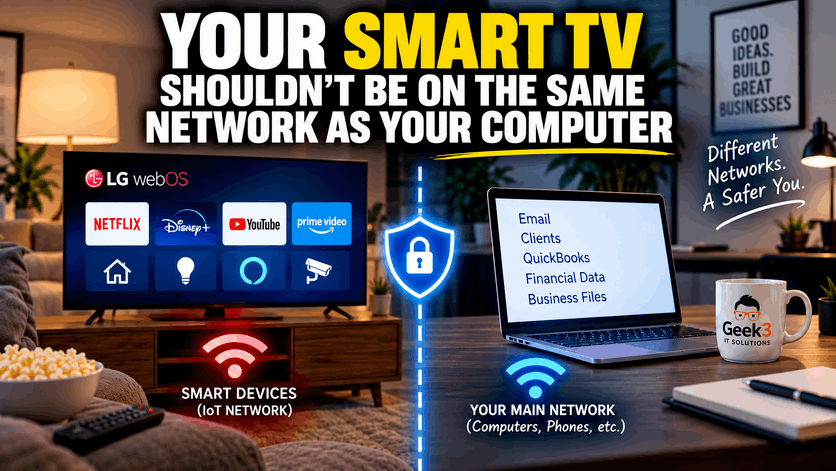
The bigger question is why your television needs to be hanging out on the same network as your business computer in the first place.
This Goes Way Beyond LG
That’s the part I think is far more useful for most people.
I’m not particularly interested in declaring LG guilty or innocent based on a two-hour YouTube investigation and a corporate statement. That’s a fight for people with considerably more free time than I have.
What interests me is that the controversy shines a giant flashlight on something most of us have barely thought about.
These aren’t just TVs anymore.
They’re computers with giant screens.
And this goes wayyyy beyond LG.
Samsung televisions are computers. Roku boxes are computers. Fire TV devices are computers. Apple TVs are computers. Your Nest thermostat is a computer. Your Ring doorbell is a computer. Your security cameras are computers. Your smart light bulb is a computer.
It may not be a particularly powerful computer, but it is still running software, communicating across a network and probably receiving occasional updates from somewhere on the internet.
Even appliances are getting in on the fun. Refrigerators can tell you when someone left the door open. Washing machines can send notifications when your clothes are finished. Ovens can be controlled remotely. Garage doors can tell you whether they’re open. You can even buy smart coffee machines.
I don’t have anything against smart devices. Some of them are genuinely useful. The issue is that every time you add another one, you’re putting another little computer on your network.
And unlike your actual computer, you probably aren’t thinking very much about its security.
Nobody Is Installing Antivirus on the Light Switch
Think about how differently we treat a laptop compared with everything else connected around it.
A business computer might have antivirus protection. It may receive managed updates. It might be monitored by an IT company. It may use multifactor authentication. Someone may be watching for suspicious behavior or making sure security patches are installed.
Then, five feet away, there’s a Wi-Fi-connected thermostat that somebody installed six years ago and hasn’t thought about since.
When was the last time you checked whether your smart light switch had a security update?
Exactly.
What about your security cameras? Have they received firmware updates recently? Do you know whether the manufacturer still supports them? Do you even know what account was originally used to set them up?
What about that old printer everyone in the office still uses?
Printers are some of the most forgotten computers in existence. They’re connected to the network, often have their own web interfaces, may store scanned documents or print jobs, and frequently sit there for years without anyone thinking much about them.
Smart devices also tend to have very different life cycles from computers. You might replace a laptop every four or five years. A television could easily stay on the wall for ten. A thermostat might stay there even longer. Security cameras often get installed and then completely forgotten until one stops working.
Yet all of those devices may still be sitting on the same network as the computer containing your customer records, accounting data, payroll information, email and business files.
That’s where network separation starts making a lot of sense.
Put the Smart Stuff at the Kids’ Table
Your primary network should be where your important stuff lives. Computers, phones, tablets, servers and other devices you actually trust with important information.
Then create a separate network for allllll the smart stuff.
Your TVs, cameras, voice assistants, streaming boxes, thermostats, game consoles, smart plugs, speakers, doorbells, light switches and whatever else you’ve connected to Wi-Fi because the box had the word “smart” printed on it.
They still get internet access. They still do their jobs. Your television can still stream Netflix. Alexa can still tell you the weather. Your thermostat can still let you know someone has apparently decided that 65 degrees is an acceptable indoor temperature in Florida.
But those devices don’t necessarily need unrestricted access to everything sitting on your primary network.
Kind of like putting the kids at their own table during Thanksgiving. They’re still invited. They’re still getting dinner. They’re still part of the family. They just don’t need unrestricted access to everything happening at the grown-up table.
That’s basically what we’re doing with a separate network.
We’re not throwing the smart devices out of the house. We’re just giving them their own table.
What Exactly Is an IoT Network?
In the IT world, you’ll hear the term IoT quite a bit.
It stands for “Internet of Things.”
Basically, it’s the enormous category of internet-connected stuff that isn’t necessarily a traditional computer. Your TV is an IoT device. Your thermostat is an IoT device. Your smart speaker is an IoT device. A business security camera can be an IoT device.
So can a door access system, printer, digital sign, conference room display or smart lighting system.
One common way to handle these devices is to place them on their own network. Sometimes that’s a separate Wi-Fi network. Sometimes it’s a VLAN, which is essentially a way of dividing one physical network into multiple logical networks.
Don’t worry too much about the terminology.
You do not need to walk into your IT person’s office tomorrow and yell, “I DEMAND A VLAN!”
Actually, please don’t.
Just ask them a much simpler question.
“Are our smart devices separated from our computers?”
That’s enough to start the conversation.
You’re Probably Already Doing This With Guests
You may already be using this same basic idea without realizing it.
A lot of businesses have guest Wi-Fi. Customers connect to one wireless network. Employees connect to another.
Why?
Because someone sitting in your waiting room who wants to check Instagram probably shouldn’t be sitting on the same network as your accounting computer.
That makes sense to almost everyone.
You probably wouldn’t tell a random customer, “Sure! The Wi-Fi password is pineapple123. That’s also the network with our server, QuickBooks computer, printers and security cameras. Enjoy!”
We separate guests because they aren’t trusted in the same way employees are.
Smart devices deserve similar consideration.
Not because your Roku is plotting against you. It’s probably not. But it doesn’t need access to everything.
That’s the important distinction.
Good security isn’t always about assuming something is malicious. A lot of it is simply asking, “What does this device actually need access to?”
If the answer is “the internet,” give it the internet.
If it doesn’t need access to your accounting computer, then don’t give it access to your accounting computer.
Pretty simple.
This Happens Constantly in Businesses
Businesses have become especially good at adding connected devices without really considering them part of the IT environment.
Someone installs a smart TV in the conference room. Someone else adds a Sonos speaker. The security company installs cameras. A thermostat company replaces the old thermostats with smart versions. The copier company installs a printer. Somebody buys an Alexa because they wanted music in the break room.
None of these purchases necessarily go through whoever handles the company’s computers.
They just appear.
And almost every installer asks the same question.
“What’s your Wi-Fi password?”
Someone gives it to them and another device joins the network.
Five years later, nobody remembers who installed it, what account controls it, whether it still receives updates or why it needed to be on the business network in the first place.
That’s how networks slowly become crowded with forgotten technology. Usually, nobody intentionally designed it that way.
It just happened.
One device came in here. Another was added over there. A television was replaced. A camera system was upgraded. A streaming box showed up in the break room. Eventually you can have dozens of devices connected to the same network without anyone ever stopping to look at the whole picture.
But Home Might Actually Be the Bigger Problem
Here’s where this gets even more interesting.
What happens when your business laptop goes home?
You might have excellent security at your office. Maybe your company’s firewall is professionally managed. Maybe the computers are monitored. Maybe everything is patched. Maybe there are separate networks for employees, guests and smart devices.
Great.
Then at 5:30, you close the laptop, toss it in your bag and take it home.
You walk through the door and connect it to your home Wi-Fi.
What’s on that network?
Maybe a smart TV. A couple of security cameras. Amazon Echo devices. Kids’ tablets. A PlayStation. A Nintendo Switch. Three streaming devices. A thermostat. A printer you bought in 2019. The doorbell. A smart vacuum. Random light switches. A garage door opener.
And something called “ESP_4A97C2” that has been connected for three years and nobody in the house has the slightest clue what it is.
Suddenly the network around that business computer looks very different.
Your laptop didn’t change.
Its surroundings did.
That’s something businesses don’t always think about when they talk about cybersecurity.
Your Home Network Can Become Part of Your Business Security
If employees regularly work from home, home networks become part of the equation whether anyone likes it or not.
That doesn’t mean your company needs to send an IT technician into every employee’s living room. But it does mean people should understand that the environment around a business computer matters.
A well-managed laptop might spend eight hours a day on a carefully designed corporate network and another four hours connected to an eight-year-old consumer router surrounded by dozens of random smart devices.
This became especially obvious as remote work expanded.
People started taking systems that previously stayed inside business networks and connecting them to whatever Wi-Fi happened to be available. Home offices. Hotels. Coffee shops. Airports. Mobile hotspots.
Technology became more portable, but the network around that technology changes constantly.
That’s one reason I think business owners should pay attention to their home networks too.
If that business laptop comes home every night, your home network just became part of your business security whether you intended it to or not.
Network Separation Isn’t Magic
I should point out something important.
Putting smart devices on another network does not magically make them secure.
It isn’t a force field.
If you use terrible passwords, ignore software updates and buy questionable internet-connected devices from random manufacturers, putting them on their own Wi-Fi doesn’t suddenly make everything perfect.
Security is usually about layers.
Good passwords are a layer. Multifactor authentication is a layer. Updates are a layer. Endpoint security is a layer. Backups are a layer. Monitoring is a layer. A firewall is a layer.
Separating devices that don’t need to talk to each other is another layer.
Each one reduces the number of things that have to go wrong before something becomes a serious problem.
That’s really the goal.
You don’t need one perfect security system. You want lots of smaller barriers working together.
What If My Smart Devices Need to Talk to My Phone?
This is usually the first question people ask, and it’s a good one.
What happens if your smart devices are separated but your phone needs to control them?
That depends on the equipment and the device.
Some devices communicate primarily through cloud services. Your phone talks to a server on the internet, your smart device talks to the same server, and they may never need to communicate directly with each other on your local network.
Other devices rely heavily on local discovery. Those can require additional configuration.
A properly designed network can often allow specific types of communication between networks without simply opening everything up.
That’s where having decent networking equipment helps.
Cheap consumer routers often give you relatively simple options. You may have a main Wi-Fi network and a guest Wi-Fi network, and that’s about it.
More capable networking equipment can provide much better control. You can create dedicated networks for smart devices, cameras, guests, servers or anything else you want, then decide which networks are allowed to communicate with each other.
That’s when a network stops being a pile of devices and starts becoming something intentionally designed.
Sometimes Guest Wi-Fi Is Better Than Nothing
For a home user, you don’t always need an elaborate business-grade setup.
Depending on your equipment, putting smart devices onto a guest Wi-Fi network can sometimes provide useful isolation from your main devices.
But don’t assume every guest network works the same way.
Some isolate devices properly. Some don’t. Some prevent guest devices from communicating with each other. Others simply create another wireless network name while everything still ends up on the same internal network.
That’s why configuration matters.
The name of the Wi-Fi network isn’t what protects you.
What matters is what the router or firewall actually allows devices on that network to reach.
You could have three beautifully named Wi-Fi networks called “Business,” “Guest” and “Smart Stuff,” but if they’re all allowed to talk freely to one another, you’ve mostly just created three names for the same thing.
It’s Not Just About Spying
The LG controversy has understandably gotten attention because “your TV might be spying on you” makes for a fantastic headline.
And yes, privacy matters.
But privacy isn’t the only reason I like network separation.
Security is another.
If a smart device has a vulnerability, I would rather it not have easy access to every computer in the building.
If an old camera gets compromised, I don’t want that camera sitting right next to the accounting server.
If someone plugs a questionable streaming box into the conference room TV, it doesn’t need to be able to see the office PCs.
The same logic applies at home.
That cheap smart plug you bought online for $11 doesn’t need a direct path to the laptop holding your tax records.
Maybe nothing bad will ever happen.
Hopefully nothing does.
But why create the opportunity when there isn’t a good reason for the devices to talk to each other anyway?
The Internet of Things Isn’t Going Away
We’re not going back to a world where TVs are just TVs.
At least not anytime soon.
People like convenience, and smart devices can genuinely be useful.
I like being able to see security cameras remotely. I like thermostats that can be adjusted from a phone. Streaming televisions are fantastic. Smart speakers can be convenient. Video doorbells are useful.
The answer isn’t to rip everything out of the wall and start buying appliances from 1997.
The answer is to stop pretending these things aren’t computers.
Treat them like computers.
Give them updates. Use good passwords. Don’t reuse passwords across services. Turn off features you aren’t using. Review privacy settings occasionally.
And think about where they belong on your network.
That’s the big one.
Ask Your IT Person
If you run a business, this doesn’t need to become your new hobby.
You don’t have to spend your weekend learning about VLAN tagging and firewall rules.
That’s what people like me are for.
Ask whoever handles your IT a simple question:
“Are our TVs, cameras and other smart devices separated from our business computers?”
If the answer is yes, great.
If the answer is no, ask whether it makes sense to change that.
There may be a perfectly reasonable reason for the way your network is configured. Every business is different. But it’s worth asking the question.
And while you’re at it, think about your house too.
Do you regularly bring a business laptop home? Does your home office computer contain business data? Are you accessing QuickBooks, customer files, Microsoft 365 or other business systems from home?
If so, your home network deserves some attention too.
The Goal Isn’t Paranoia
I don’t want people reading this and immediately unplugging every television in the house.
You don’t need to wrap Alexa in aluminum foil.
I’m not telling you your refrigerator has joined an international cybercrime syndicate.
The goal is simply awareness.
Technology has crept into practically everything.
We used to think about network security mostly in terms of computers. Now the computer might be hanging on the wall pretending to be a television, attached to your ceiling pretending to be a camera or mounted beside your front door pretending to be a doorbell.
That’s the world we live in now.
The good news is that networks can be designed around that reality.
You don’t have to give every device the same access.
Your smart TV can stay smart. Alexa can keep answering questions. Your security cameras can keep recording. Your thermostat can keep judging your temperature choices.
They can all have internet access. They can all do what you bought them to do.
They just don’t need to be BFFs or roommates with QuickBooks.
If you’re not sure how your business network is set up, ask your IT person.
And if you don’t have someone handling that for you, that’s exactly the kind of thing I help businesses with every day.
I can also help with home networks, especially when business computers regularly travel between the office and home.
If you’d like help separating, cleaning up or securing the devices on your business or home network, shoot me a message.
I’m always happy to talk.
