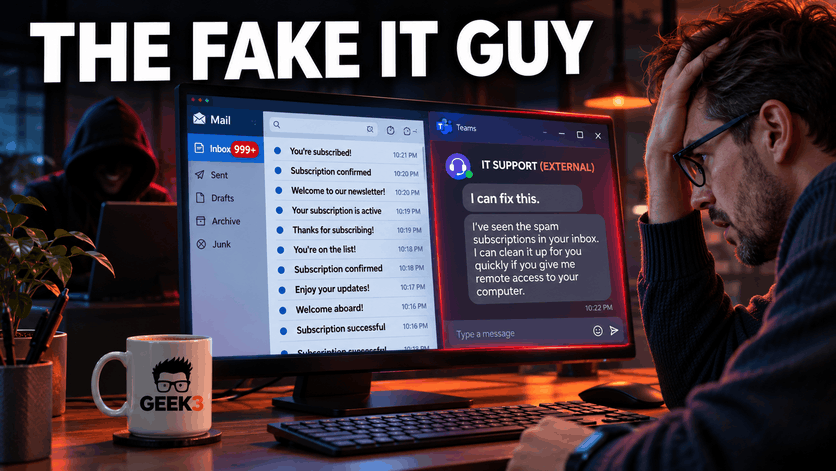

Imagine you’re sitting at your desk on a perfectly normal Tuesday morning. You’ve got your coffee, you’re catching up on some emails, and you’re trying to figure out why somebody scheduled another meeting that could have easily been an email.
Then something strange happens.
Your inbox starts filling up with messages. Not just a couple of spam emails, but hundreds of them.
You’ve apparently subscribed to newsletters from companies you’ve never heard of. You’re receiving registration confirmations, promotional offers, welcome messages, and subscription notifications from websites you have absolutely no recollection of visiting.
Before long, your inbox resembles the aftermath of giving your email address to every marketing company in America.
Naturally, you assume something is wrong.
And just as you’re wondering whether to call IT, Microsoft Teams pops up with a message from someone claiming to be your company’s technical support department.
They’ve apparently noticed the unusual email activity and would be happy to help.
What incredible timing!
Unfortunately, that helpful technician might actually be the person responsible for the entire mess.
Welcome to one of the more interesting social engineering attacks making the rounds in 2026. Instead of simply trying to trick someone into clicking a malicious link, cybercriminals are deliberately creating a technical problem and then impersonating the people who are supposed to fix it.
And according to recent cybersecurity research, they’re having some success.
The Latest Cybersecurity Scam Has a Familiar Face
On October 26, 2026, cybersecurity company Arctic Wolf published research examining more than 400 incidents in which attackers abused Microsoft Teams’ external chat functionality to impersonate IT personnel or carry out other malicious activity.
One of the recurring tactics involved something called email bombing.
In a significant number of cases, attackers deliberately flooded an employee’s inbox with hundreds of newsletter registrations and subscription confirmations. Shortly afterward, someone claiming to work in IT would contact the employee through Microsoft Teams, offering to resolve the mysterious problem.
It’s a remarkably simple concept.
Imagine someone deliberately clogging your kitchen sink and then showing up at your front door wearing a plumber’s uniform.
They’re friendly, knowledgeable, and apparently available immediately. You already have a problem, and now somebody is volunteering to solve it.
What could possibly go wrong?
Well, in the cybersecurity version, that helpful plumber wants remote access to your computer.
The attackers aren’t necessarily trying to steal anything with the initial flood of emails. Their first goal is to frustrate the employee, create urgency, and establish a convincing reason for someone from IT to make contact.
The timing is what makes the scam effective.
If a random person messages you on Teams offering technical assistance, you might find that suspicious. But if your inbox has just become completely unusable and that person appears to know exactly what’s happening, suddenly the offer sounds much more legitimate.
That’s the trap.
And what’s particularly concerning is that the attack doesn’t depend on breaking into Microsoft Teams or exploiting some newly discovered software vulnerability.
It relies on convincing an ordinary employee that a criminal is actually a trustworthy technician.
First, They Create the Problem
Let’s look at how this attack typically begins.
A cybercriminal identifies an employee at a business. They might find the person’s email address on the company’s website, through LinkedIn, or from information that’s already publicly available.
Business email addresses aren’t particularly difficult to discover, especially for employees whose job involves communicating with customers or vendors.
Once the attacker has the address, the email bombing begins.
The employee suddenly receives a flood of messages from legitimate websites, mailing lists, and subscription services.
And here’s something that makes this attack a little different from conventional spam.
Many of those messages can be completely legitimate emails from real organizations.
The websites aren’t necessarily participating in the attack knowingly. The criminal is simply abusing their registration or subscription systems to generate a flood of unwanted correspondence.
That means traditional spam filters might not catch everything.
A confirmation email from a legitimate newsletter service might pass normal security checks because the sending organization is real and the message itself doesn’t contain anything obviously malicious.
The employee, meanwhile, is watching dozens or hundreds of new emails roll in and wondering what in the world happened.
Important business messages start getting buried underneath the flood. The employee becomes frustrated and distracted.
And that’s precisely the mental state the attacker wants.
There’s another concern here too. Email bombing can sometimes be used to bury a genuine security notification, purchase receipt, or account-change alert inside the noise.
So while the sudden flood may appear to be nothing more than an annoying inconvenience, it should be treated as a potential security warning.
Deleting all the messages and hoping the problem goes away isn’t necessarily the best response.
Then Comes the World’s Most Convenient IT Technician
Now that the employee has a problem, the second part of the attack begins.
A message arrives through Microsoft Teams from someone with an official-sounding name.
Maybe it’s “IT Support (Internal),” “Corporate IT Service,” or “Help Desk Manager.”
The message might explain that the company has detected unusual email activity and that the technician needs to perform a quick repair.
They’re polite, professional, and apparently familiar with the problem.
Exactly what you’d expect from a legitimate support technician.
Except they’re not.
According to Arctic Wolf’s research, attackers have been creating external Microsoft Teams identities with names designed to appear as though they belong to a company’s internal IT department.
Some use familiar first names to make the messages feel personal. Others include security-related symbols, official-looking labels, or even the victim company’s name.
A label saying “Internal” doesn’t actually make someone internal, of course.
But the attacker is hoping the employee won’t examine the sender’s identity too closely.
And if the employee has already spent 20 minutes trying to figure out why their mailbox has exploded, that assumption isn’t particularly unreasonable.
The attacker may also move the conversation from a Teams chat to a voice call. Speaking directly with someone can make the interaction feel more authentic, especially if the person sounds calm, helpful, and technically knowledgeable.
The objective is to turn an unexpected message from a stranger into what feels like a routine IT support interaction.
Once that happens, the attacker is considerably closer to getting what they really want.
Access to the computer.
Why Microsoft Teams Makes This So Interesting
Most businesses have spent years teaching their employees to be careful with suspicious emails.
Don’t click unexpected links. Don’t open attachments you weren’t expecting. Don’t enter your password into a website just because an email tells you to.
That’s all good advice.
But cybercriminals know employees are becoming more suspicious of email, so they’re looking for other ways to reach them.
And collaboration platforms are attractive targets.
Microsoft Teams has become a normal part of everyday business operations. Employees use it to communicate with coworkers, share files, attend meetings, and collaborate with outside organizations.
It feels like part of the company’s private workspace.
But that feeling can create a false sense of security.
Depending on an organization’s configuration, Microsoft Teams allows people from outside the company to initiate conversations with employees.
This feature exists for a perfectly legitimate reason. Businesses frequently need to communicate with vendors, contractors, customers, and other organizations.
Unfortunately, the same functionality can also provide attackers with a way to reach employees.
Arctic Wolf specifically pointed out that external access is enabled by default in Teams under the applicable federation settings.
That doesn’t mean every outside person is automatically trusted or that Microsoft has completely ignored the issue.
Teams includes indicators and warnings to help distinguish external contacts.
The problem is that attackers know how to take advantage of the way people interact with those warnings.
Someone who is frustrated, distracted, or desperate to get back to work might focus on the friendly support message rather than the external-user label sitting beside it.
And that’s enough to create an opportunity.
The lesson isn’t that Microsoft Teams is inherently unsafe.
It’s that a familiar application doesn’t automatically make every person using it trustworthy.
A criminal doesn’t become a legitimate employee simply because their message arrives through Microsoft 365 instead of Gmail.
The Dangerous Part Isn’t the Message
At this point, you might be thinking that receiving a suspicious Teams message isn’t particularly dangerous by itself.
And generally speaking, you’re right.
The real danger begins when the employee starts following the supposed technician’s instructions.
In many of the incidents examined by Arctic Wolf, attackers attempted to persuade employees to launch remote-support software.
One of the most frequently observed tools was Microsoft Quick Assist.
Quick Assist is a legitimate remote-support application included with Windows. It allows someone to help another person troubleshoot a computer remotely.
It’s useful software, and there’s nothing inherently wrong with using it.
In fact, legitimate IT professionals rely on remote-access tools every day. At Geek3, remote support is a major part of how we help our customers without having to physically visit their offices for every little problem.
Other legitimate products, including ScreenConnect, AnyDesk, and TeamViewer, have also appeared in these attacks.
The important distinction is that the attackers aren’t necessarily using fake remote-support software.
They’re abusing real software that was designed for legitimate technical assistance.
And that makes this scam more difficult for ordinary employees to recognize.
If someone asked you to download a mysterious application from an unfamiliar website, you might hesitate.
But if they instruct you to open a program that’s already installed on your Windows computer, the request feels considerably less suspicious.
Once the attacker establishes a remote session, they may attempt to install additional software, collect credentials, or execute commands.
They might also install another remote-access tool to maintain access after the original support session ends.
And that’s where a simple Teams conversation can become a much larger security incident.
The computer may look perfectly normal afterward.
The fake technician might even tell the employee that everything has been repaired.
Meanwhile, the attacker could have left behind software designed to provide access later.
So the employee goes back to work, believing the problem has been resolved, while the criminal has an entirely different project underway.
How Quickly Can This Become a Real Problem?
One of the more alarming findings from Arctic Wolf’s report was the speed at which some attacks progressed.
In certain successful cases, the researchers observed malicious code execution in under 15 minutes after the victim engaged.
Think about that for a moment.
Fifteen minutes is a pretty ordinary IT support session.
It’s enough time for someone to explain a problem, launch a remote-support application, follow a few instructions, and believe that the technician has completed the repair.
Unfortunately, it’s also enough time for a criminal to begin compromising a system.
And the consequences can extend far beyond the employee’s own computer.
Once attackers have access to a workstation, they may start looking for other devices, network resources, user accounts, and systems that could provide additional opportunities.
Microsoft published separate research in September 2026 describing attacks that began with fake IT support contacts through Teams and progressed into reconnaissance, malicious software installation, and attempts to move through corporate networks.
In other words, the initial victim’s computer may only be the beginning.
There’s evidence that these campaigns can lead to serious damage, too.
Sophos investigated Teams-based impersonation attacks earlier in 2026 that ultimately resulted in Chaos ransomware deployment in several incidents.
That doesn’t mean every fake IT support message leads to ransomware.
But it does demonstrate why these attacks deserve more attention than simply dismissing them as annoying chat spam.
The attacker isn’t necessarily interested in fixing your inbox.
They may be looking for a foothold into your entire organization.
But We Have Antivirus and Multifactor Authentication!
This is usually where someone points out that their business already pays for antivirus software and requires multifactor authentication.
Both are good things.
In fact, they’re important layers of business security.
But neither one automatically prevents an employee from handing remote control of their computer to a stranger.
Think about the difference.
Antivirus and endpoint protection are designed to detect or prevent malicious activity. Depending on the product and configuration, they may block downloads, suspicious commands, malware, and unauthorized software behavior.
Multifactor authentication helps protect accounts by requiring an additional verification step during sign-in.
But what happens if the employee is already signed in to their computer and voluntarily allows someone else to control it?
The attacker may be operating inside an existing user session.
They might have access to whatever applications and resources that employee can reach, at least until security controls detect or stop the activity.
That doesn’t mean antivirus or MFA is useless.
Quite the opposite.
Strong endpoint protection, application controls, identity monitoring, and other defenses can still interrupt various stages of the attack.
But no single security product can solve the entire problem.
This is why I regularly remind business owners that cybersecurity isn’t simply a matter of installing a product and declaring the company protected.
There are multiple layers involved.
And one of those layers is understanding who should be allowed to access your computers in the first place.
Your Employees Don’t Need to Be IT Experts
One thing I want to emphasize is that the goal here shouldn’t be to make every employee paranoid about every message they receive.
That’s neither practical nor productive.
People have jobs to do. They’re answering customers, processing orders, managing schedules, and trying to keep the business moving.
They shouldn’t need a degree in computer science to recognize whether someone claiming to be IT support is legitimate.
What they need is a simple process.
For example, employees should know exactly how their company’s real IT provider normally contacts them.
If technical support generally happens through a particular phone number, email address, or support portal, that should be clearly communicated.
Employees should also understand that it’s perfectly acceptable to question an unexpected request.
If someone contacts them out of nowhere and asks to connect remotely, the employee should know they can decline the request and contact their actual IT provider to verify it.
This isn’t about being rude to the technician.
A legitimate technician should have no problem with someone wanting to verify their identity.
In fact, I would much rather have a customer call Geek3 to double-check a support request than blindly grant access to someone pretending to work for us.
That kind of verification might add two minutes to the process.
But those two minutes could prevent a very expensive incident.
The key is to create a security culture in which employees feel comfortable asking questions rather than feeling pressured to cooperate with someone who sounds authoritative.
How Businesses Can Protect Themselves
The good news is that there are several practical ways businesses can reduce their exposure to this particular attack.
And most don’t require replacing all your software or making dramatic changes to the way employees work.
1. Review External Microsoft Teams Access
Start by having your IT provider review how Microsoft Teams handles communication with outside organizations.
Does your company actually need to accept chat requests from any Microsoft Teams tenant?
Some businesses collaborate regularly with customers or partners through Teams, so external communication may be necessary.
Others use Teams almost exclusively for internal communication.
Microsoft provides controls that allow administrators to restrict external access to specific trusted domains.
For organizations that don’t require open external communication, limiting this access can substantially reduce opportunities for fake support accounts to reach employees.
Of course, these settings should be reviewed carefully. A business that relies heavily on outside collaboration could accidentally disrupt legitimate communication by blocking everything without planning first.
Security should support the business, not make everybody’s job impossible.
2. Establish a Remote-Support Policy
Employees should know how legitimate remote-support sessions are initiated and approved.
If they request assistance, they should receive it through a known process.
If a technician contacts them unexpectedly, employees should verify the request using an established phone number or support channel before granting access.
This applies whether the technician wants to use Quick Assist, ScreenConnect, TeamViewer, or another application.
The question isn’t simply whether the software is legitimate.
It’s whether the person requesting access has been properly verified.
3. Limit Unauthorized Remote-Access Tools
Businesses should also consider restricting which remote-access applications can run on company computers.
If your IT provider uses a particular management platform, there’s usually little reason for employees to install several other remote-control applications without authorization.
Application controls and endpoint security policies can help prevent unauthorized remote-access tools from being installed or executed.
This doesn’t mean banning every remote-support application in existence.
It means defining which tools are approved and ensuring that unexpected installations generate attention.
4. Teach Employees About Email Bombing
Most security awareness training focuses heavily on suspicious links and attachments.
That’s important, but employees should also know what to do when something unusual happens that doesn’t initially look like a traditional phishing attempt.
Receiving hundreds of unsolicited subscription confirmations within minutes is not normal.
Employees should report that activity to their IT provider rather than treating it as just another annoying spam problem.
And if someone claiming to be from IT contacts them shortly afterward, that sequence of events should raise even more suspicion.
5. Monitor the Activity That Follows
Businesses with managed security services have opportunities to detect suspicious behavior beyond the initial message.
Unexpected remote-support software, unusual command execution, new persistence mechanisms, and abnormal account activity can all provide clues that something is wrong.
The important thing is having systems and people in place to investigate those events quickly.
A security alert that nobody reviews until the following week isn’t particularly useful against attackers who can begin executing malicious code in minutes.
This is one reason layered security and active monitoring are so valuable.
What If Someone Has Already Granted Access?
Let’s say an employee receives the suspicious Teams message, launches Quick Assist, and allows the supposed technician to connect.
Then, halfway through the session, something feels wrong.
Maybe the technician begins opening applications unrelated to the original problem. Maybe they start using PowerShell, downloading software, or asking for passwords.
Or perhaps the employee simply realizes they have no idea who the person actually is.
At that point, the employee should immediately stop cooperating and contact their legitimate IT provider through a trusted channel.
If the remote session is still active, they should end it. If they cannot safely end the session, IT may instruct them to disconnect the device from the network.
The employee should not assume that ending the visible remote session automatically removes everything the attacker may have installed.
That’s an important distinction.
An attacker who has already established persistent access might still be able to reconnect through another method.
The IT provider should investigate what happened, including whether unauthorized applications were installed, whether account credentials or sessions may have been compromised, and whether other systems were accessed.
Depending on what occurred, the appropriate response might include isolating the computer, resetting affected credentials, revoking active sessions, examining security logs, or rebuilding the workstation.
Employees should also preserve the suspicious messages and avoid deleting potentially useful evidence until the IT team has assessed the incident.
Most importantly, they should report the mistake immediately.
The longer an attacker remains undetected, the more opportunities they may have to cause damage.
Don’t Forget About the Original Email Flood
There’s another part of this attack worth mentioning.
Remember those hundreds of unwanted emails that started the whole thing?
Even if the employee never grants remote access to the fake technician, the email bombing itself should still be investigated.
In some attacks, the flood of messages may serve more than one purpose.
It creates the obvious problem that the fake technician offers to fix, but it can also make legitimate security notifications much harder to notice.
Imagine receiving an important notification that someone changed the recovery information on an account.
Normally, that message might grab your attention.
But if it arrives in the middle of 400 subscription confirmations, it may be buried before you ever see it.
That’s why it’s a good idea for the IT team to review the mailbox activity rather than simply delete all the unwanted messages.
There may be legitimate account notifications, payment confirmations, or other alerts hiding in the noise.
The presence of an email bombing incident doesn’t automatically mean an account has been compromised.
But it absolutely deserves a closer look, especially if it coincides with unexpected support contacts or other unusual activity.
Why This Matters to Small Businesses
It’s tempting to think attacks like these are primarily a concern for large corporations.
After all, they’re the ones with hundreds of employees, enormous networks, and extensive IT departments.
But the fundamental technique works just as well against smaller businesses.
In fact, small businesses can have their own unique challenges.
An employee at a smaller company may not know exactly who handles IT. Perhaps technical support is provided by an outside company that only contacts them occasionally.
A message from someone claiming to be “IT Support” may seem plausible simply because the employee doesn’t recognize the names of the technicians who normally provide assistance.
And when the business is busy, the employee may be more interested in getting their email working again than spending time verifying someone’s identity.
That’s understandable.
But it’s also exactly the opportunity the attacker is looking for.
The solution isn’t to make employees memorize the names of every technician.
It’s to create a straightforward support process that everybody understands.
Who do you call when something goes wrong? How do you submit a support request? How do you know when someone is genuinely authorized to access your computer?
Those are simple questions every business should be able to answer.
And the answers should be established before something unusual happens.
The Real Lesson: Trust Needs to Be Verified
What makes this particular scam interesting is that the attacker isn’t relying on an especially sophisticated technical exploit to get started.
They’re using tools and services that businesses already trust.
Microsoft Teams is legitimate. Quick Assist is legitimate. Remote-support software is legitimate.
The malicious part is the person pretending to have a legitimate reason to use them.
And that’s what makes social engineering such a persistent problem.
Cybercriminals don’t always have to break through your security systems. Sometimes, they convince an employee to open the door for them.
In this case, they make that request even more convincing by creating the exact problem they claim to be fixing.
It’s the digital equivalent of an arsonist showing up with a fire extinguisher and a business card.
The answer isn’t to stop trusting every piece of technology you use. It’s to have a reliable way of verifying who’s asking for access and why.
At Geek3, we help small businesses manage their computers, networks, Microsoft 365 environments, and cybersecurity protections. That includes making sure remote support is provided safely and that employees know how to identify suspicious requests.
Because the best time to establish a secure support process is before a stranger shows up offering to fix a problem nobody asked them to create.
And if your inbox suddenly receives a few hundred newsletter subscriptions followed by a suspiciously helpful Microsoft Teams message, remember one thing.
The person offering to solve your IT emergency might be the person who created it.
Before you hand over your computer, call the people you actually trust.
Preferably before that helpful stranger starts installing things.
Sources and Further Reading
- Arctic Wolf: Beyond the Inbox, How Threat Actors Abuse Microsoft Teams External Chat for Initial Access (October 26, 2026)
- Microsoft Security: Impersonating IT Support, How Threat Actors Turn a Remote Session Into Enterprise-Wide Access (September 2, 2026)
- Sophos: Chaos in Teams Vishing
- Microsoft Learn: Managing External Teams Communication
