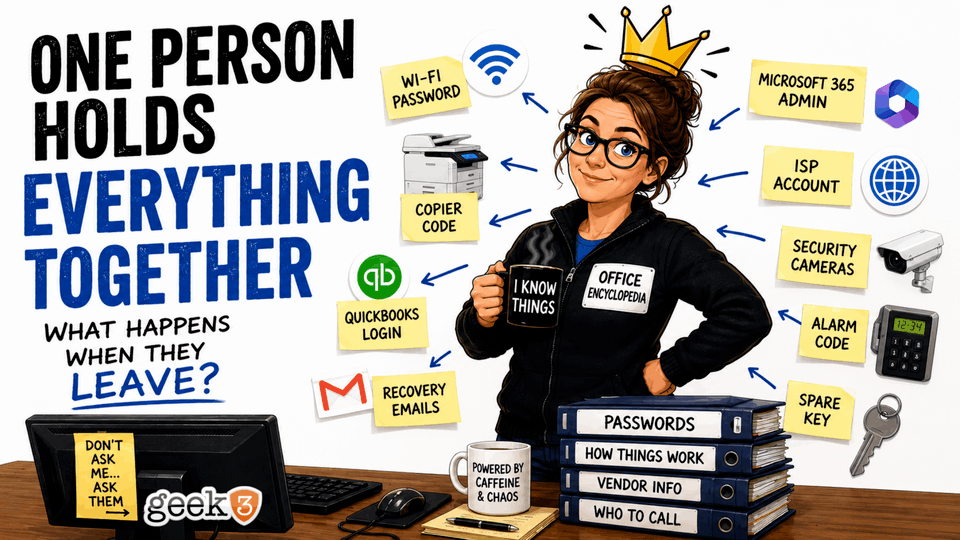

If I asked you who the most valuable employee in your company is, who would you pick?
Maybe it’s your top salesperson. They bring in the revenue.
Maybe it’s your office manager. Nothing seems to happen without them.
Maybe it’s your accountant, operations manager, or even your business partner.
All of those would be reasonable answers.
But after nearly two decades working with small businesses, I think there’s another employee that rarely gets the recognition they deserve. In fact, most business owners don’t even realize how important this person is until they’re gone.
I’m talking about the person who knows… everything.
Not everything about the business itself. Everything around the business.
The Wi-Fi password.
The copier administrator code.
Who hosts the company website.
Where the domain name was purchased.
Who to call when the internet goes down.
Which security company monitors the alarm.
How to add a new employee to Microsoft 365.
Which breaker shuts off the conference room.
The password to the QuickBooks company file.
The login for the payroll portal.
The recovery email for the company Google account.
The list just keeps going.
Every office has one.
You know exactly who I’m talking about.
They’re the person everyone instinctively walks toward when they have a question.
“Hey… what’s the password for…”
“Do you remember who…”
“Can you help me with…”
Sometimes I think people don’t even finish the question because they already know the answer will be, “Sure, I know.”
The funny part?
They almost never asked for this job.
The Accidental Expert
Nobody gets hired with the title of “Keeper of Every Random Piece of Company Knowledge.”
It happens gradually.
Five years ago, someone asked them to order a new copier.
The installer gave them the administrator password because they happened to be standing there.
A year later, the company needed Microsoft 365.
Someone had to create the account, so they did.
Then the office needed a website update.
Someone needed to renew the domain.
Someone needed to call the internet provider.
Someone needed to schedule the alarm company.
Someone needed to deal with the phone vendor.
One task became two.
Two became ten.
Ten became fifty.
Eventually, they became the office encyclopedia without anyone ever officially assigning them the role.
That’s usually because they’re responsible, organized, and dependable.
They’re the person everyone trusts.
Ironically, those are wonderful qualities to have in an employee.
Unfortunately, they’re also the exact qualities that cause important business knowledge to slowly collect around one person.
Nobody notices it’s happening because it happens over years.
If you asked everyone in the office today who manages the company website, they’d probably all point to the same person.
That seems perfectly normal.
Until one day…
The Day Everything Changes
Businesses plan for all kinds of emergencies.
Fire.
Flood.
Power outages.
Cyberattacks.
Server failures.
But very few businesses plan for something far more common.
People leave.
Sometimes it’s planned.
Someone retires after twenty years.
Everyone signs a card.
There’s cake in the break room.
A few speeches are made.
People laugh about old memories.
It’s a happy day.
Then Monday morning arrives.
Someone needs to add a new employee to Microsoft 365.
Nobody knows who has administrator access.
The website needs an update.
Nobody knows where it’s hosted.
The internet goes down.
Nobody knows the account number.
Accounting needs QuickBooks support.
Nobody knows who originally purchased the software.
A security camera stops recording.
Nobody knows the administrator password.
The office doesn’t come to a complete stop.
But it certainly slows down.
Simple questions suddenly become scavenger hunts.
What should have taken thirty seconds now takes three hours.
Sometimes three days.
I’ve watched businesses spend an entire afternoon trying to answer one simple question.
Who owns the company website?
You’d be surprised how often the answer is…
“I’m not really sure.”
We’ve Seen This Movie Before
Working in IT gives you a front-row seat to situations most business owners never realize are happening.
We don’t just fix computers.
We see what happens when years of undocumented information finally catches up with a business.
One example that sticks with me involved something incredibly ordinary.
A company’s website suddenly stopped loading.
No problem, right?
Just call the web hosting company.
Except…
Nobody knew who the hosting company was.
Nobody knew who registered the domain.
Nobody knew which email address had been used years earlier to create the account.
The employee who handled all of that had left the company several years before.
The owner assumed marketing handled it.
Marketing assumed IT handled it.
IT assumed the owner had the credentials.
Nobody was wrong.
Nobody was right.
The information simply disappeared when the employee left.
Eventually everything was recovered.
The website came back online.
But what should have been a ten-minute fix turned into days of phone calls, account recovery forms, identity verification, old invoices, and conversations that started with:
“Hi… we’re pretty sure we own this website…”
Not exactly where you want to be.
Unfortunately, stories like that aren’t rare.
We’ve seen Microsoft 365 environments where the only Global Administrator account belonged to someone who hadn’t worked there in years.
We’ve seen internet accounts tied to an employee’s personal Gmail account.
We’ve seen software licenses disappear because nobody remembered who purchased them.
We’ve seen backup software sending daily success reports…
…to an inbox that nobody had opened since 2019.
Everyone assumed backups were working because no one knew those emails even existed.
Thankfully, in those cases the backups actually were working.
Imagine if they hadn’t been.
Those aren’t technology failures.
Those are documentation failures.
It’s Not Really an IT Problem
This is where I think people misunderstand what’s happening.
When I tell someone they have an IT problem, they picture broken computers.
Servers.
Viruses.
Networking.
Firewalls.
But this isn’t really about technology.
Technology just happens to expose the issue first.
The real problem is something businesses call business continuity.
Business continuity is simply the ability for your business to continue operating when something unexpected happens.
That “something” could be a hurricane.
It could be a ransomware attack.
It could be a power outage.
Or…
It could simply be Susan taking another job.
Businesses lose employees every day.
That’s normal.
What shouldn’t be normal is losing access to critical business information when they leave.
Think about all the things that exist outside of computers.
Vendor relationships.
Insurance portals.
Payroll systems.
Building access.
Utility accounts.
Bank contacts.
Office leases.
Phone numbers.
Emergency procedures.
Those things often live inside someone’s head just as much as your IT systems do.
Technology simply tends to reveal the cracks first because people notice immediately when they can’t log in.
The bigger issue is that knowledge silos exist everywhere.
One person knows payroll.
One person knows HR.
One person knows accounting.
One person knows purchasing.
One person knows IT.
Individually, that doesn’t sound dangerous.
Collectively, it creates a business that’s far more fragile than anyone realizes.
The Domino Effect Nobody Sees Coming
One of the biggest misconceptions I see is that people assume losing institutional knowledge creates one problem.
It rarely does.
It creates dozens.
Imagine your office manager retires on Friday.
Monday morning, a new employee starts.
Human Resources asks for a Microsoft 365 account.
Nobody has administrator access.
While trying to figure that out, someone realizes the password reset email is tied to the retired employee’s personal Gmail account.
Meanwhile, the receptionist notices the company website contact form has stopped working.
The web developer asks for access to the domain registrar.
Nobody knows who owns it.
Around lunchtime, the internet goes down.
The provider asks for the account PIN.
Nobody has it.
Later that afternoon, accounting needs to reinstall QuickBooks on a new computer.
Nobody knows where the license information is stored.
Then someone remembers the copier lease is about to expire.
Who was the contact person?
No idea.
None of those problems are particularly difficult on their own.
The problem is they all happen at once.
Instead of spending the day serving customers or growing the business, your staff suddenly becomes a team of detectives trying to reconstruct years of forgotten decisions.
Every hour spent chasing passwords, account numbers, and vendor contacts is an hour your business isn’t moving forward.
Those hours add up quickly.
The Most Expensive Problems Aren’t Technical
People often ask me what the biggest IT disasters I’ve seen are.
Honestly?
Most of them didn’t start with technology.
They started with assumptions.
Someone assumed another employee knew the password.
Someone assumed the website company would always have a copy.
Someone assumed accounting had the software license.
Someone assumed the internet provider would know who they were without verification.
Businesses run on assumptions every single day.
Most of the time, that’s fine.
Until one assumption turns out to be wrong.
I once heard someone describe documentation as “insurance for your memory.”
I think that’s pretty accurate.
You don’t document everything because you expect disaster.
You document things because people forget.
People change jobs.
People retire.
People take vacations.
People get promoted.
Life happens.
Good businesses aren’t built around perfect people with perfect memories.
They’re built around systems that continue working even when people change.
Documentation Sounds Boring Because… Well… It Is
Let’s be honest.
Nobody wakes up excited to document their internet account number.
Nobody says, “You know what sounds like a fun Friday afternoon? Creating a spreadsheet of software licenses.”
Documentation is about as exciting as organizing your garage.
It’s one of those projects everyone agrees is a good idea.
It just never seems urgent.
Until it suddenly becomes the most important thing in the building.
Think about smoke detectors.
Nobody enjoys installing them.
Nobody posts pictures on social media showing off their new smoke detector.
But if there’s ever a fire, you’ll be awfully glad it was there.
Documentation works the same way.
Its value isn’t measured on the days when everything goes right.
Its value shows up on the days when everything goes wrong.
So… What Should Actually Be Documented?
This is where many businesses accidentally overcomplicate things.
They imagine a giant three-inch binder full of technical diagrams that nobody will ever understand.
That’s not what I’m talking about.
Good documentation should answer the questions your business asks every week.
Who is our internet provider?
Where is our website hosted?
Who owns our domain name?
Who has administrator access to Microsoft 365?
Where are our backups?
Who supports our phone system?
What model firewall do we have?
Where are software licenses stored?
Who monitors the alarm system?
Who services the copier?
How do we contact each vendor?
What happens if the server won’t turn on?
Those aren’t technical questions.
They’re business questions.
The goal isn’t to create documentation for the sake of documentation.
The goal is to make sure the next person doesn’t have to become a detective.
Passwords Deserve Special Attention
If there’s one area where businesses consistently get themselves into trouble, it’s passwords.
I’ve seen them taped to monitors.
Written inside desk drawers.
Stored in Excel spreadsheets.
Saved in Word documents.
Texted between employees.
Emailed back and forth.
Shared in ways that make cybersecurity professionals wake up in a cold sweat.
The problem isn’t that people are careless.
The problem is they’re trying to solve an immediate issue.
“Sarah needs the password.”
“I’ll just text it to her.”
Problem solved.
Except now there are six different copies floating around.
Nobody knows which one is current.
Nobody knows who changed it last.
A secure password manager solves a surprising number of these problems.
It gives multiple authorized people access when appropriate.
It creates an audit trail.
It keeps passwords organized.
Most importantly, it removes the phrase, “I think John knows it.”
Technology should never depend on what someone thinks another person remembers.
This Is Where Managed IT Becomes More Than Just IT
People often think managed IT is about fixing computers.
That’s certainly part of it.
But some of the most valuable work we do doesn’t involve touching a keyboard.
It involves asking questions.
Who owns your website?
Where are your backups?
Who receives alerts if backups fail?
Who has Microsoft 365 administrator rights?
Who can call the internet provider?
How do you recover if your office floods tomorrow?
Those conversations aren’t glamorous.
They don’t generate flashy before-and-after pictures.
But they prevent an incredible amount of frustration down the road.
Sometimes we’ll ask a client a simple question, and everyone in the room looks at each other.
Nobody knows the answer.
That’s not embarrassing.
It’s actually incredibly common.
What’s important is identifying those gaps before they become emergencies.
Because it’s much easier to answer those questions on a Tuesday afternoon than it is during a server outage on Monday morning.
One Bus. One Lottery Ticket.
There’s an old business expression called the “bus factor.”
It asks a simple question:
“How many people could disappear before your business stops functioning?”
The name is a little dark, but the idea is solid.
Personally, I like using a happier version.
The lottery factor.
Imagine your most knowledgeable employee wins a $500 million Powerball jackpot tonight.
First of all, good for them.
Second…
How would tomorrow go?
Could someone still log into Microsoft 365?
Could payroll still be processed?
Could you still update your website?
Would your backups continue working?
Could someone contact every major vendor?
Would the business continue operating?
If the answer to those questions is “probably,” you’re in decent shape.
If the answer is “I’m honestly not sure,” you’ve just identified one of the biggest opportunities to strengthen your business.
Your Best Employee Shouldn’t Be a Single Point of Failure
This article isn’t about replacing good employees.
Quite the opposite.
The people who hold all this knowledge are usually incredible employees.
They’re organized.
Dependable.
Helpful.
They’ve quietly kept the business running for years.
The goal isn’t to reduce their value.
It’s to protect the business they’ve helped build.
Because eventually everyone takes a vacation.
Everyone gets sick.
Everyone retires.
Everyone moves on.
That’s normal.
Your business should be able to continue succeeding when that happens.
Technology shouldn’t depend on one person’s memory.
Neither should your business.
Final Thoughts
If you’re reading this and immediately pictured someone in your office, you’re not alone.
Every business has that person.
Maybe it’s your office manager.
Maybe it’s your controller.
Maybe it’s your operations director.
Maybe… it’s you.
If that’s the case, take it as a compliment. It means people trust you.
But it should also serve as a reminder.
Start getting that knowledge out of your head.
Document it.
Organize it.
Share it with the people who need it.
Future employees will thank you.
Future managers will thank you.
And one day, when you finally decide to take that well-earned vacation, retire, or maybe even win the lottery, your business won’t have to skip a beat.
That’s exactly what we help our clients do every day. Yes, we manage computers, networks, Microsoft 365, cybersecurity, and all the technical pieces you’d expect. But we also help businesses organize the information that keeps everything running behind the scenes. We document systems, secure passwords, identify single points of failure, and make sure critical knowledge isn’t trapped inside one person’s memory.
If your business would struggle because one employee was unexpectedly out of the office tomorrow, let’s fix that before tomorrow arrives. Feel free to reach out. We’d be happy to help.
