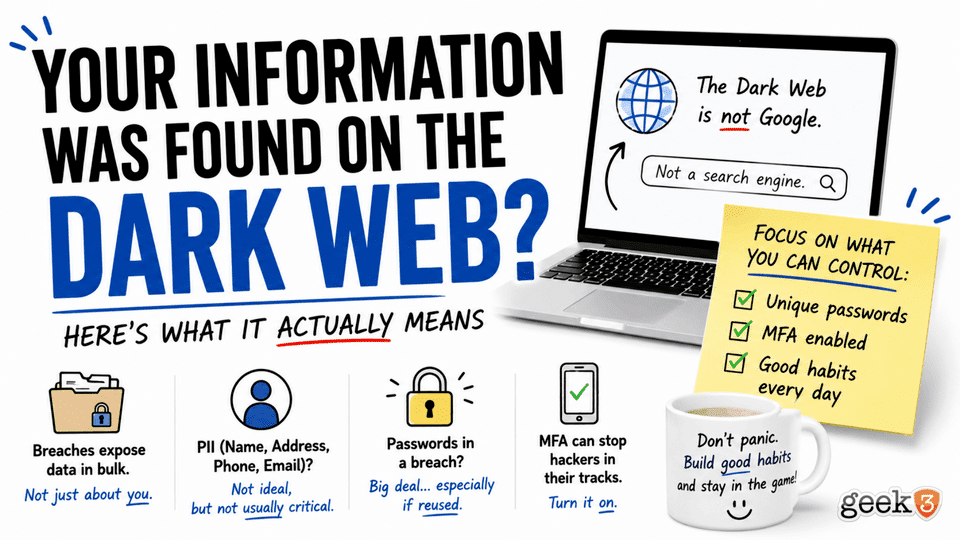

As someone who works in IT, I can’t tell you how many times someone has called me after seeing one of these overly common notifications:
“Your information has been found on the Dark Web.”
The first time you see that message, it’s a little unsettling.
Your phone lights up.
Your password manager sends you an alert.
Maybe Google notifies you.
Maybe your bank does.
Suddenly you’re wondering if your identity has been stolen, your bank account is about to disappear, and some hacker in another country is shopping online with your credit card.
The questions usually start almost immediately.
“What do I do?”
“Should I cancel my credit cards?”
“Has someone hacked my computer?”
And honestly… I think the wording of these alerts does more harm than good.
When most people hear the words Dark Web, they picture some hacker sitting in a dimly lit room wearing a hoodie, typing names into a search box.
“Let’s see… Erik Herrera…”
Click.
“Excellent… he shops at Home Depot… apparently buys an unhealthy amount of networking equipment… and owns way too many HDMI adapters. Gentlemen… we’ve got him.”
Thankfully, that’s not how it works.
Well… at least not most of the time.
The reality is much less exciting.
And fortunately, much less scary.
The Dark Web Isn’t What Most People Think
I think Hollywood has done a fantastic job making the Dark Web sound like some mysterious underground internet where criminals gather around glowing computer screens waiting to ruin your day.
The truth is considerably more boring.
The Dark Web isn’t one giant website.
It isn’t one giant database.
There isn’t a search engine where hackers type your name and instantly see everything you’ve ever done online.
Instead, think of it like thousands of different websites that simply aren’t indexed by Google or Bing. Many require special software, like Tor, to access.
Some are perfectly legitimate.
Journalists use it.
Political activists use it.
People living under oppressive governments use it to communicate safely.
And yes… criminals use it too.
Just like criminals also use email, smartphones, and pickup trucks.
The technology itself isn’t evil.
It’s simply another part of the internet.
The thing people should really understand isn’t the Dark Web itself.
It’s the data that ends up there.
So How Does My Information Get There?
Let’s pretend you create an account on your favorite online store.
Or maybe it’s a restaurant rewards program.
Or a travel website.
Or that random recipe site you joined back in 2014 because you were determined to finally learn how to make homemade bread.
Every company stores information about its customers.
Usually things like your name, email address, phone number, shipping address, password, and maybe even your birthday.
That’s completely normal.
Now imagine one day that company gets hacked.
Here’s where most people imagine a hacker breaking into one specific account.
Yours.
But that’s almost never what happens.
Attackers usually aren’t interested in stealing information about one customer.
They’re after the entire database.
Think of it like robbing a bank.
If someone breaks into a vault, they don’t usually take one safety deposit box.
They wheel the entire vault out the front door if they can.
That’s exactly what happens during many data breaches.
Instead of stealing one customer’s information, attackers steal millions of customer records all at once.
Sometimes those records include only basic contact information.
Sometimes they include passwords.
Sometimes much more.
It all depends on what the company stored and whether that information was encrypted properly.
What Happens After a Data Breach?
This is the part most people never think about.
Once criminals have that stolen database, they have several options.
Sometimes they sell it.
Sometimes they trade it to another criminal group.
Sometimes they use it themselves.
And sometimes they simply dump it online for free.
Why give it away?
Because stolen data loses value over time.
A password from ten years ago isn’t worth nearly as much as one stolen yesterday.
Some criminal groups also release stolen databases to build credibility in underground communities. Others leak them because negotiations with the hacked company failed.
Whatever the reason, these databases eventually begin circulating.
Some stay hidden.
Others spread everywhere.
Eventually, cybersecurity companies obtain copies of many of these databases.
Not because they’re buying them from criminals to participate in illegal activity, but because once data is leaked widely enough, security researchers use it to help protect people.
That’s where those alerts come from.
What Those “Dark Web Monitoring” Alerts Actually Do
One of the biggest misconceptions I hear is that these monitoring services somehow watch hackers in real time.
Not exactly.
Think of them more like librarians.
Imagine someone hands them a truckload of phone books.
Their job isn’t to figure out who wrote the phone book.
Their job is to search for your name.
If they find it…
They let you know.
That’s essentially what many Dark Web monitoring services do.
They compare your email address, usernames, or other identifiers against known breach databases.
If your information appears in one of those databases, you receive a notification.
Notice something important here?
Nobody specifically targeted you.
You simply happened to have an account with a company that got breached.
That distinction matters.
A lot.
Not Every Dark Web Alert Is a Five-Alarm Fire
This is probably the biggest takeaway from this entire article.
Not all data breaches are created equal.
Let’s compare two fictional examples.
Company A gets hacked.
The attackers steal:
- Your name
- Email address
- Phone number
- Mailing address
Company B gets hacked.
The attackers steal:
- Your email address
- Password
- Date of birth
- Social Security number
- Driver’s license number
Both companies might trigger the exact same notification:
“Your information was found on the Dark Web.”
But those situations are nowhere near equal.
One is an inconvenience.
The other could become a very bad day.
Unfortunately, the alerts don’t always explain the difference.
That’s why it’s important to understand what was actually exposed instead of immediately assuming the worst.
What Is Personally Identifiable Information (PII)?
You’ll often hear people in cybersecurity throw around the term PII.
It stands for Personally Identifiable Information, which is simply information that can identify you.
Things like:
- Your full name
- Home address
- Phone number
- Email address
- Date of birth
Is it ideal for that information to be floating around online?
Of course not.
But let’s also be realistic.
If you’ve bought a house, registered to vote, ordered products online, donated to a charity, subscribed to a magazine, or even signed up for a grocery store rewards card, pieces of your personal information already exist in dozens… maybe hundreds… of company databases.
That’s simply the reality of living in today’s connected world.
Could someone use your name and address for scams?
Absolutely.
That’s why phishing emails, fake invoices, and convincing phone scams have become so common.
The more information a scammer has, the more believable they can make their story.
“Hi Mr. Herrera. We’re calling about the package being delivered to your address on…”
Suddenly it sounds legitimate because they already know your name and address.
But here’s the important distinction.
Knowing your address isn’t the same thing as having access to your bank account.
Knowing your birthday isn’t the same thing as logging into your email.
Personally Identifiable Information can certainly make social engineering attacks easier, but by itself it’s usually not enough to take over your digital life.
That’s why, when I receive one of these notifications, there’s really only one thing that immediately catches my attention.
Passwords.
Because that’s where the real trouble usually begins…
Passwords: The Real Problem
I know.
You’ve probably heard IT people talk about passwords more times than you care to count.
Trust me… we get tired of talking about them too.
But there’s a reason they come up every single time there’s a major data breach.
It’s because passwords are usually the one piece of information that can create a chain reaction.
Let’s pretend you signed up for a fishing forum back in 2016.
Maybe you wanted advice on bass fishing.
Maybe your uncle convinced you.
Maybe you created the account, visited twice, and forgot it ever existed.
When you signed up, you picked a password.
Not just any password.
Your password.
The one you knew you’d remember.
Fast forward eight years.
That fishing forum gets hacked.
Who cares?
Well… maybe you should.
Not because anyone wants access to your fishing account.
Because criminals know something about human nature.
We’re creatures of habit.
If that password worked once, there’s a decent chance it works somewhere else.
So instead of logging into your fishing account, they try that same email address and password combination on Gmail.
Then Microsoft.
Then Amazon.
Then PayPal.
Then Netflix.
Then your bank.
They’re not “hacking” those companies.
They’re simply trying the same key in a hundred different locks until one opens.
This type of attack is called credential stuffing, and it’s surprisingly effective.
Not because hackers are brilliant.
Because people are busy.
We all have dozens… maybe hundreds… of online accounts.
Remembering a different password for every single one sounds exhausting.
So people naturally take shortcuts.
I’ve even had clients proudly tell me,
“Oh, that’s the password I use for everything. Makes life easier.”
I completely understand why they do it.
But that’s also the moment I quietly begin planning my password speech.
Because one hacked website can suddenly become the doorway to everything else.
Why Different Passwords Actually Matter
Let’s think about it another way.
Imagine your house key opened every door in your neighborhood.
Convenient?
Absolutely.
Safe?
Not even close.
Now imagine one day you lose that key.
Suddenly every house is at risk.
That’s exactly what happens when the same password is reused everywhere.
One company gets breached.
One password leaks.
Now every account using that password becomes a target.
That’s why IT professionals constantly encourage unique passwords.
We’re not trying to make life harder.
We’re trying to keep one company’s bad day from becoming your bad week.
“But I’ll Never Remember That Many Passwords”
I hear this all the time.
Honestly…
It’s a fair point.
Most people probably have somewhere between 100 and 300 online accounts.
Banking.
Streaming.
Shopping.
Medical portals.
Insurance.
Utilities.
Travel websites.
Social media.
The list never seems to end.
Nobody expects you to memorize 300 completely random passwords.
That’s where password managers come in.
Applications like Bitwarden, 1Password, Dashlane, Apple Passwords, and others can generate long, random passwords and remember them for you.
Now instead of remembering 300 passwords…
You remember one.
If password managers aren’t your thing, I actually wrote another article about a simple method I’ve recommended to clients for years. It uses a memorable base password with a small variation that’s unique to each website. It’s not as strong as a password manager, but it’s still a huge improvement over using the exact same password everywhere.
The important thing isn’t how you get there.
It’s simply making sure different websites have different passwords.
Multi-Factor Authentication Is One of the Best Security Tools We Have
While we’re talking about passwords…
Let’s talk about something that has saved countless people from disaster.
Multi-Factor Authentication.
Or MFA.
Or 2FA.
Whatever your favorite acronym happens to be.
If a website gives you the option to turn it on…
Do it.
Seriously.
Think of your front door.
The password is the key.
MFA is the deadbolt.
Even if someone steals your key, they still can’t get inside without that second lock.
That’s essentially how MFA works.
Even if someone knows your password, they still need access to your phone, authenticator app, security key, or another verification method before they can sign in.
Is it perfect?
No.
Nothing in cybersecurity is.
But it stops an enormous number of attacks before they ever become a problem.
In my opinion, enabling MFA is one of the best five-minute investments you can make in your digital life.
So… What Should You Actually Do?
Let’s circle back to that notification.
“Your information has been found on the Dark Web.”
Okay.
Now what?
First…
Don’t panic.
Seriously.
Take a breath.
The notification itself isn’t telling you someone emptied your bank account.
It’s telling you your information appeared in a known breach.
The next step is finding out what information was exposed.
If it was an account you haven’t used in years…
Great.
Change the password if you still can, or simply delete the account.
If it’s an active account…
Change the password.
If that same password is being used anywhere else…
Change those too.
Notice what I didn’t say?
I didn’t tell you to throw your computer away.
I didn’t tell you to close your bank account.
I didn’t tell you to cancel every credit card you own.
Most of the time, the solution is far less dramatic.
It’s simply changing a password and making sure it isn’t reused elsewhere.
Can You Remove Your Information From the Dark Web?
This is another question I hear quite a bit.
The honest answer?
Usually… no.
Once information has been copied, downloaded, reposted, traded, mirrored, and shared across countless websites and forums, there’s no magical “Delete” button.
That’s why prevention matters so much.
Once the toothpaste is out of the tube…
Getting it back in is pretty difficult.
The good news is that old breach data becomes less valuable over time.
People change passwords.
Credit cards expire.
Accounts get closed.
Companies improve security.
The information becomes stale.
That’s another reason security experts encourage changing passwords after a breach.
You’re essentially making that stolen information worthless.
The Dark Web Isn’t the Enemy
I think the Dark Web has become the boogeyman of cybersecurity.
It makes for dramatic headlines.
“Millions of records found on the Dark Web!”
“Your information is on the Dark Web!”
“Hackers are selling your data!”
Those headlines get attention.
But they don’t always provide context.
The reality is that the Dark Web is simply one place where stolen information sometimes ends up.
The real problem started much earlier.
It started when a company failed to protect customer data.
Or when someone reused the same password across twenty different websites.
Or when phishing emails tricked an employee into giving away credentials.
The Dark Web is often the last chapter of the story, not the first.
Final Thoughts
I’m honestly not afraid of the Dark Web.
Nor do I think you should be.
I think we all have to accept that living in today’s connected world means some of our information is probably already floating around somewhere. That’s simply the reality of online banking, online shopping, streaming services, smartphones, social media, and just about everything else we use every day.
That doesn’t mean we stop buying phones.
It doesn’t mean we unplug our smart TVs.
It doesn’t mean we swear off online shopping forever and move into a cabin in the mountains.
It just means we build better habits.
Use different passwords.
Turn on Multi-Factor Authentication wherever it’s available.
Pay attention when companies announce data breaches.
And don’t let scary notifications convince you the sky is falling.
Cybersecurity isn’t about becoming impossible to hack.
It’s about making yourself enough of a pain in the booty that the bad guys decide you’re not worth the effort.
I hope this helped clear up some of the mystery surrounding those “Your information was found on the Dark Web” alerts.
If you’d like more practical, plain-English technology and cybersecurity tips without all the fear, hype, and buzzwords, I’d love for you to stick around. That’s exactly why I write these articles.
And if your business is trying to make sense of cybersecurity, data breaches, password security, or just wants someone to call before a small problem becomes a big one, feel free to reach out. Helping people navigate technology without the panic has been my job for a long time, and I’d be happy to help.
